
Reclaim Calendar Sync Alternative: Just Sync, No AI Planner (2026)
October 2026
Looking for a Reclaim calendar sync alternative? If you signed up to Reclaim only to stop double bookings between calendars, you are paying per seat for an AI planner you may never use. Calensync does one thing: it syncs your Google, Outlook, Apple (iCloud) and .ics calendars, with unlimited syncs for $35 a year.
.. and get 7 days free trial
Quick verdict: who should switch?
Pick Calensync if you want calendar sync and nothing else. It suits Apple users, anyone with more than two or three calendars, and anyone who wants control over what the copied events look like.
Stay with Reclaim if you want an AI planner for habits, tasks and focus time, smart meeting times, or you are happy on its free plan with a single sync between Google or Outlook calendars.
Reclaim vs Calensync pricing (yearly)
Reclaim bundles Calendar Sync into a scheduling assistant priced per seat. The free Lite plan includes 1 calendar sync and 2 connected calendars. Starter is $10 per seat per month billed annually, and Business is $15. Reclaim's pricing page lists the Starter sync limit as 3 in one place and unlimited in another, so check it before you buy.
| Setup (synced both ways) | Calensync | Reclaim |
|---|---|---|
| 2 calendars | $35/yr | $0 (Lite plan, 1 sync) |
| 3 jobs, 3 calendars | $35/yr | $120/yr (Starter) |
| Assistant with 6 calendars | $35/yr | $180/yr (Business) |
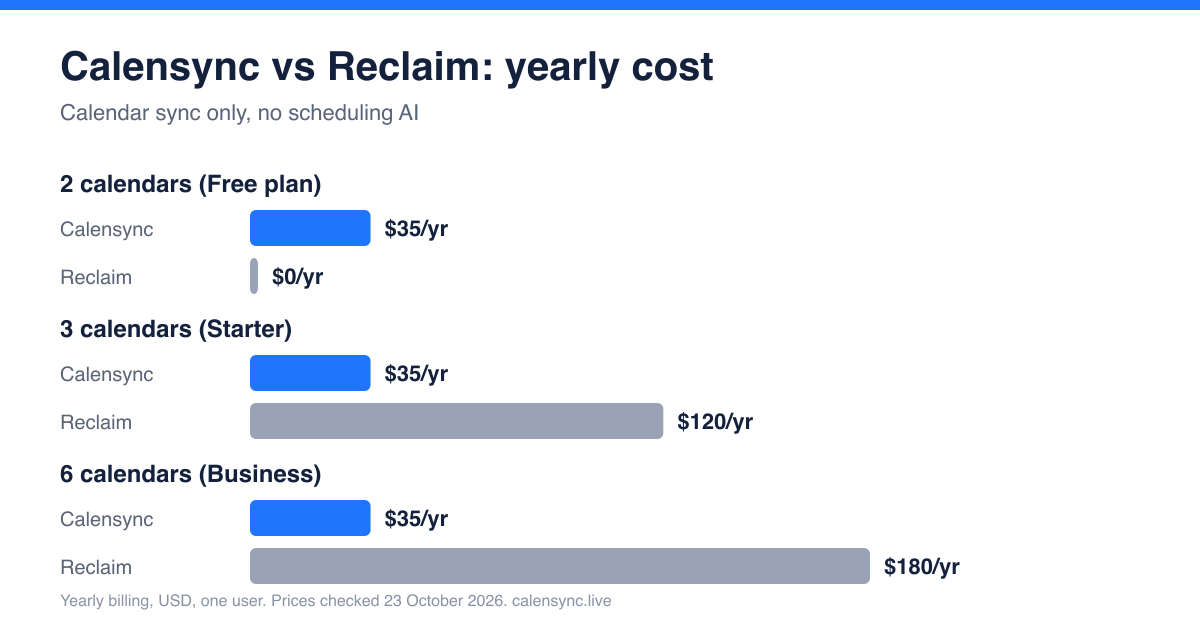
Reclaim's free plan is the cheapest option for two calendars, and we say so plainly. Once you connect a third calendar you need a paid plan, and the cost rises per seat from there. Calensync stays at $4 a month or $35 a year no matter how many calendars you link.
Calensync vs Reclaim: feature comparison
| Feature | Calensync | Reclaim |
|---|---|---|
| Providers | Google, Outlook, Apple (iCloud), .ics (read-only) | Google and Outlook; iCloud only if shared into one of them |
| Calendar syncs | Unlimited | 1 on Lite; 3 or unlimited on Starter (page is inconsistent); unlimited on Business |
| Sync direction | Any direction, one rule per direction | Two-way sync between connected calendars |
| Sync speed | Seconds to a few minutes, depending on the provider | Described as real time |
| Busy-only mode | Yes, or replace the title with any text | Visibility presets: Work Commitment, Personal Commitment, Busy, or details for you and authorised viewers |
| Filters | Regex on title and description, status, response, free events | All-day events, busy all-day events, or events within work hours |
| Buffer time | Yes | Not listed for sync |
| Booking links | Scheduling links | Scheduling Links (1 on free) |
| AI features | MCP server for Claude, ChatGPT and others | AI planner for habits, tasks, focus time and meetings |
| Team features | Team billing; members keep calendars private | Business and Enterprise team plans |
| Trial / free tier | 7-day trial, no card | Free Lite plan |
Where Calensync wins
Apple and iCloud support
Reclaim's help centre says Calendar Sync only works with calendars connected to a Google or Microsoft Outlook account. iCloud events have to be shared into one of those first, and Reclaim warns that shared calendars can sync with long delays. Calensync connects to Apple Calendar directly using an app-specific password, and syncs it in both directions with Google and Outlook. Read how in our Apple Calendar sync guide.
Unlimited syncs, in any direction
Each Calensync rule runs one way, so you decide exactly which calendar feeds which. Show work events on your personal calendar with full details, and personal events on your work calendar as "Busy". Add as many rules as you want. There is no sync counter to run out of, and no separate plan for more calendars.
Titles and filters you control
Reclaim's documented sync options are a set of visibility presets. Calensync lets you replace an event title with any text, add a prefix, hide the location, set colours, and filter by regex on the title or description. You can also keep tentative, declined or free events out of a sync.
Where Reclaim wins
- Planning, not just syncing. Reclaim schedules habits, tasks and focus time around your meetings, and finds meeting times for you. Calensync doesn't do that.
- Task integrations. It connects to tools such as Google Tasks, Todoist, Asana, ClickUp, Jira and Linear.
- A free plan. If one sync between two calendars is all you need, Reclaim's Lite plan costs nothing. Calensync has a 7-day trial and then a paid plan.
How to switch from Reclaim to Calensync
- Turn off Reclaim's sync first. In Reclaim, delete your Calendar Sync entries (and remove the copied events if you want a clean slate). Do this before creating Calensync rules or you will get duplicate blocks.
- Connect your calendars. Sign up and add your Google, Outlook or Apple accounts from the dashboard.
- Create your rules. Add one rule per direction, choose full details or "Busy", and test with one event before you cancel your Reclaim plan.
.. and get 7 days free trial
FAQ: leaving Reclaim for Calensync
Is Calensync private? What can IT see?
Calensync doesn't store event titles, descriptions or other event details, and the code is open source. IT admins can see which third-party apps are authorised on a work account and any events that appear in that calendar. If you sync a personal calendar into work as "Busy", only the busy block is visible. See the privacy policy.
Do I need Microsoft 365 admin approval?
Possibly. Microsoft's default Entra ID settings since November 2025 ask an admin to approve third-party apps before users can connect their calendars. That applies to every sync tool, Reclaim and Calensync included.
Can I cancel any time?
Yes. Calensync is $4 a month or $35 a year, and you can cancel whenever you like. It never modifies or deletes your existing events.
Will I lose smart scheduling?
Yes, if you rely on it. Calensync is only calendar sync plus scheduling links. If you like Reclaim's planner, keep it and use Calensync for the syncing part, or stay on the free plan.
Prices checked on 23 October 2026 from Reclaim pricing, Reclaim's Calendar Sync feature page and Reclaim's Calendar Sync help article. Reclaim prices are per seat, billed annually, in USD. Plans change, so confirm on their site. Our own prices are on the plan page.
Sync Google, Outlook, and ICS with Apple Calendar. Keep every device aligned without juggling accounts by hand.
Discover how to filter events and decide exactly what to synchronize