
OneCal Alternative: Unlimited Calendars for $35/Year, Not Per-User Pricing (2026)
October 2026
Looking for a OneCal alternative? OneCal caps you at 2, 5 or 50 calendars depending on the plan and charges per user. Calensync is a flat $35 a year with no calendar cap, and it syncs Google, Outlook, Apple (iCloud) and .ics calendars, with regex filters for deciding exactly what gets copied.
.. and get 7 days free trial
Quick verdict: who should switch?
Pick Calensync if you are one person who has outgrown two calendars and doesn't want to move to a business plan. You get unlimited calendars, regex filters, buffers and busy-only blocks for $35 a year.
Stay with OneCal if you need native iOS, Android and macOS apps, a SOC 2 Type II report, single sign-on and SCIM for a team, or a 14-day trial. OneCal is the more mature product for organisations.
OneCal vs Calensync pricing (yearly)
OneCal charges per user and limits how many calendars each user can connect: Starter allows 2, Essential allows 5 and Premium allows 50. Calensync has one plan with unlimited linked accounts and unlimited sync rules.
| Setup (synced both ways) | Calensync | OneCal |
|---|---|---|
| 2 calendars | $35/yr | $60/yr (Starter) |
| 3 jobs, 3 calendars | $35/yr | $120/yr (Essential, up to 5 calendars) |
| Assistant with 6 calendars | $35/yr | $300/yr (Premium, up to 50 calendars) |
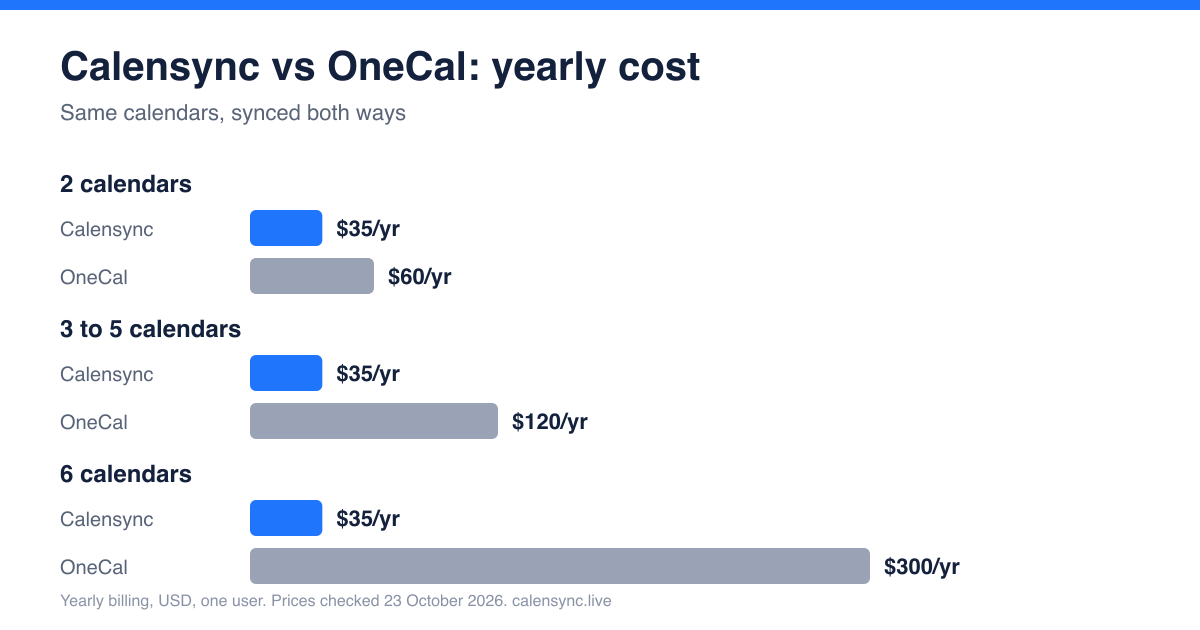
OneCal's headline prices are per user per month when billed annually ($5, $10 and $25). Calensync is $4 a month or $35 a year. Running a team? See the team page for how Calensync handles member subscriptions.
Calensync vs OneCal: feature comparison
| Feature | Calensync | OneCal |
|---|---|---|
| Providers | Google, Outlook, Apple (iCloud), .ics (read-only) | Google, Outlook, iCloud, CalDAV |
| Calendar cap | None | 2, 5 or 50 depending on plan |
| Sync speed | Seconds to a few minutes, depending on the provider | Real time for Google and Outlook; iCloud checked about every 10 minutes |
| Busy-only mode | Yes, per rule, with any replacement title | Yes: new syncs block the time slot and details are opt-in toggles |
| Filters | Regex on title and description, status, response, free events | Colour or category, RSVP response, free events |
| Buffer time | Yes | Via booking-link buffers |
| Booking links | Scheduling links | Unlimited one-to-one and collective links on all plans |
| .ics feeds | Yes, as a read-only source | Not listed as a sync source |
| Team features | Team billing; members keep calendars private | User provisioning API, admin-managed accounts, SSO/SCIM, audit logs |
| Apps | Web | iOS, Android and macOS |
| Security attestations | Open source, stores no event details | SOC 2 Type II, GDPR DPA |
| Trial | 7 days, no card | 14 days, no card |
Where Calensync wins
No calendar cap
OneCal's Starter plan stops at two calendars. Add a third and you pay double; add a sixth and you are in the $300 tier. Calensync doesn't count calendars, so a freelancer with a day job, three clients and a personal calendar pays the same $35 as someone with two calendars. If you are in the common situation of outgrowing the 2-calendar plan but not wanting a business tool, this is the main reason to switch.
Regex filters and finer rules
OneCal can exclude events by colour or category, by RSVP response, or when they are marked free. Calensync does all of that and adds regex filtering on the title and description, so one pattern such as ^(Focus|Lunch|OOO) can keep a whole class of events out of a sync. Each rule can also set its own colour, visibility, location handling and buffer time.
.ics feeds and a lower price
You can add any .ics link as a read-only source, for example a booking tool, a class timetable or a sports fixture list, and have those events appear on your main calendar. OneCal doesn't list .ics feeds as a sync source on its docs. At $35 a year, Calensync is also $25 cheaper than OneCal's cheapest plan.
What about privacy and busy-only mode?
Both tools can copy a personal event into a work calendar as a plain busy block. OneCal's own docs say a new sync blocks only the time slot unless you switch details on, and Calensync lets you pick "Busy" or any text you like per rule. Neither is the privacy winner by default; check the settings of whichever tool you use before syncing a personal calendar into a work account. Calensync doesn't store event titles or descriptions, and its code is open source. See the privacy policy for details.
Where OneCal wins
- Apps. OneCal ships iOS, Android and macOS apps. Calensync is a web app.
- Security and teams. OneCal lists SOC 2 Type II, SSO through OIDC or SAML, SCIM directory sync and audit logs. If your company's security review requires those, OneCal is the better fit.
- Booking and bundle. Unlimited booking links, workflow automation and integrations such as Zoom and Google Meet come with every plan, and the trial is 14 days rather than 7.
- CalDAV. OneCal lists CalDAV accounts, which Calensync doesn't.
How to switch from OneCal to Calensync
- Turn off OneCal's sync first. In OneCal, pause or delete your calendar syncs before you create new ones. If both tools run at once you will get duplicate events.
- Connect your calendars. Sign up and connect your Google, Outlook and Apple accounts from the dashboard.
- Recreate your rules. Add one sync rule per direction, choose full details or "Busy", set any filters, and check a test event before cancelling OneCal.
.. and get 7 days free trial
FAQ: moving from OneCal
Is Calensync private? What can my IT team see?
Calensync doesn't store event titles, descriptions or other event details, and doesn't sell or analyse your data. IT admins can see which apps are authorised on a work account and any events that land in that calendar. Sync a personal calendar in as "Busy" and only the busy block is visible. Details are in the privacy policy.
Do I need Microsoft 365 admin approval?
Maybe. Since November 2025 Microsoft's default Entra ID settings ask an administrator to approve third-party apps before users can connect their calendars. That applies to any sync tool, OneCal and Calensync alike. If your company calendar blocks it, ask IT to approve the app.
Can I cancel any time?
Yes. Calensync is $4 a month or $35 a year and you can cancel whenever you like. Your existing events are never modified or deleted by Calensync.
Is there a free trial?
Yes, 7 days with no credit card.
Prices checked on 23 October 2026 from OneCal pricing, OneCal calendar sync docs and OneCal's help centre. OneCal prices are per user, billed annually, in USD, before tax. Plans change, so confirm on their site. Our own prices are on the plan page.
Choosing the Best Calendar Syncing Solution: Calensync vs OneCal
Discover how to filter events and decide exactly what to synchronize
Empower your team with seamless calendar synchronization while maintaining complete privacy. Perfect for remote teams, professional services firms, healthcare organizations, legal practices, and any privacy-conscious organization.