
CalendarBridge Alternative: Cheaper Calendar Sync Without the Connection Maths (2026)
October 2026
Looking for a CalendarBridge alternative? If you only need your calendars kept in sync, you can do the same job for a flat $35 a year, with no connection limits to count. Calensync syncs Google, Outlook, Apple (iCloud) and .ics calendars, in any direction, with unlimited calendars and unlimited sync rules.
.. and get 7 days free trial
Quick verdict: who should switch?
Pick Calensync if you want two-way sync across several calendars (a day job, a side job, a personal calendar) without paying more every time you add one, and you want fine control over what gets copied: busy-only blocks, custom titles, regex filters and buffers.
Stay with CalendarBridge if you need a signed HIPAA Business Associate Agreement, paid booking pages through Stripe, a mobile unified-calendar app, or a vendor with a published SOC 2 Type II report.
What CalendarBridge costs for real setups
CalendarBridge prices by sync connections, and a connection is one-way. Syncing two calendars in both directions takes two connections. Syncing three calendars in all directions takes six (each calendar feeds the other two), and six calendars take thirty. Their help docs on managing syncs describe the same counting: one connection per ordered pair.
The individual plans, billed yearly, cap those connections at 2, 20 and 56. That is where the price jumps come from.
| Setup (synced both ways) | Calensync | CalendarBridge |
|---|---|---|
| 2 calendars (2 connections) | $35/yr | $48/yr (Basic) |
| 3 jobs, 3 calendars (6 connections) | $35/yr | $96/yr (Premium) |
| Assistant with 6 calendars (30 connections) | $35/yr | $384/yr (Pro) |
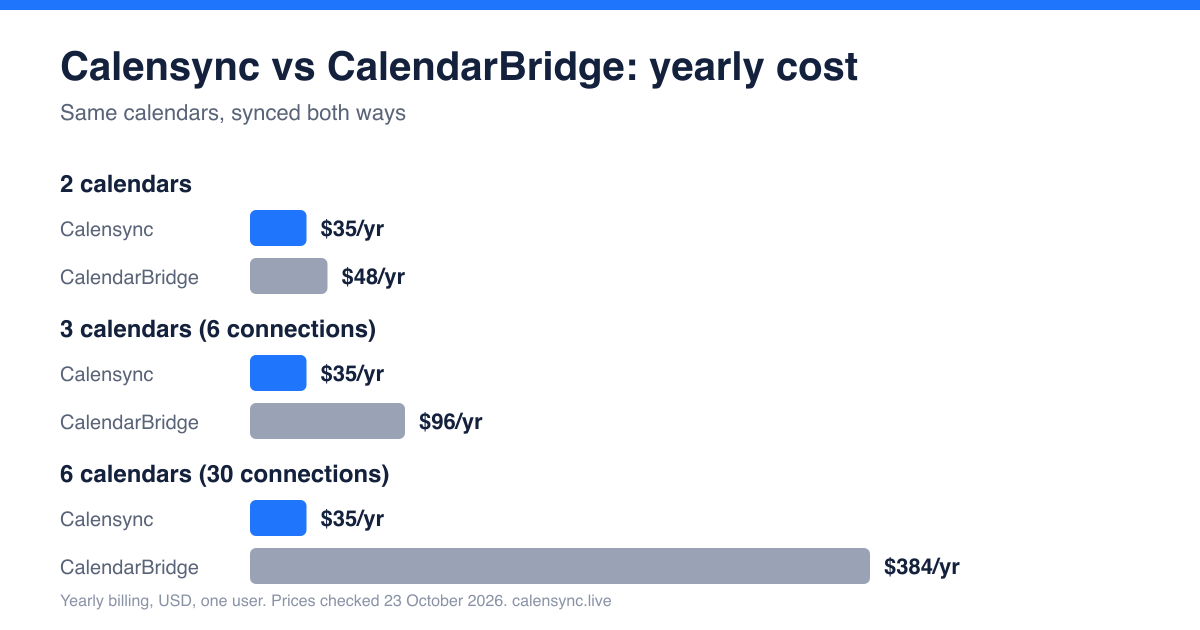
Calensync is $4 a month or $35 a year for unlimited linked accounts and unlimited sync rules. If you only sync one direction (say, work into personal as busy blocks), CalendarBridge's smaller plans are closer to our price. The gap opens once you sync more than two calendars in both directions.
Calensync vs CalendarBridge: feature comparison
| Feature | Calensync | CalendarBridge |
|---|---|---|
| Providers | Google, Outlook, Apple (iCloud), .ics (read-only) | Google, Microsoft 365, Outlook.com, iCloud, .ics link |
| Sync speed | Seconds to a few minutes, depending on the provider | Google and Microsoft in about a minute or two; iCloud and .ics every 5 to 10 minutes |
| Busy-only mode | Yes, per sync rule | Yes (full, busy, or in between) |
| Filters | Regex on title and description, status, response, free events | Exclude by colour or category |
| Custom titles, prefixes, colours | Yes, plus location and visibility controls | Subject identifiers and colour coding |
| Buffer time | Yes | Not listed on the pricing page |
| Booking links | Scheduling links, no payments | Scheduling pages, with Stripe payments |
| Team features | Team billing; members keep their own calendars private | Team scheduling, admin tools |
| AI | MCP server for Claude, ChatGPT and others | Email-based AI scheduling assistant |
| Compliance | Open source, stores no event details | SOC 2, HIPAA BAA (Premium and Pro), GDPR DPA |
| Trial | 7 days, no card | Free trial, no card (length not published) |
Where Calensync wins
No connection maths
With Calensync you never count connections. You link as many accounts as you like and draw as many rules as you need. Adding a sixth calendar does not move you to a higher tier. If you keep a day job, a client calendar, a side project and a personal calendar in step, your bill stays at $35.
More control over what gets copied
Calensync lets you set each rule on its own: copy everything, replace the title with any text (or just "Busy"), add a prefix, hide the location, set visibility to private, pick a colour, or skip tentative and declined events. For anything more specific, regex filtering lets you include or exclude events by title or description, for example skipping every event that matches Lunch|Focus|Gym. CalendarBridge's exclusions are based on colour or category, which is simpler but less precise. You can also add buffer time around synced events.
A price that doesn't depend on topology
At $35 a year flat, the cost of a full-mesh setup doesn't grow. At six calendars, that is roughly a tenth of CalendarBridge's Pro plan. It also helps if you manage calendars for someone else, such as an executive assistant who has to keep a boss's work, family and board calendars aligned.
Where CalendarBridge wins
- Paid bookings. CalendarBridge lets you charge for bookings through your own Stripe account, with no commission on their side. Calensync's scheduling links are free-to-book only.
- Compliance. CalendarBridge lists SOC 2 Type I and II and offers a HIPAA Business Associate Agreement on Premium and Pro. If your organisation needs that paperwork, it is the safer choice.
- Apps and extras. It has a unified-calendar app for web, iPhone and Android, and an AI scheduling assistant that works by email.
What about iCloud, .ics and Microsoft 365?
Both tools support iCloud and .ics links, so you don't have to switch for coverage. In Calensync, .ics sources are read-only: you can pull a feed into another calendar, but nothing is written back to the feed. CalendarBridge lists iCloud and .ics syncs as refreshing every 5 to 10 minutes. Calensync's own timing depends on the provider and ranges from seconds to a few minutes, so if you rely on near-instant iCloud updates, test it during the trial.
Since November 2025, Microsoft's default Entra ID settings require administrator consent before users can grant third-party apps access to their calendars. CalendarBridge documents this and the same rule applies to any sync tool, including Calensync. For a client's Microsoft 365 tenant, you may need their IT team to approve the app first.
How to switch from CalendarBridge to Calensync
- Turn off CalendarBridge syncing first. In CalendarBridge, pause or delete your sync groups. If you cancel, it removes the event copies it created. Do this before you create any Calensync rules, otherwise you'll end up with duplicate events.
- Connect your calendars. Sign up and add your Google, Outlook or Apple accounts from the dashboard.
- Recreate your rules. Create a sync rule for each direction you need, choose full details or "Busy", and add filters or buffers if you want. Check one event end to end before you cancel the old plan.
.. and get 7 days free trial
FAQ: switching from CalendarBridge
Is Calensync private? What can my employer's IT see?
Calensync doesn't save event titles, descriptions or other event details, and the code is open source. An IT admin can see which third-party apps are authorised on a work account, and they can see whatever events land in that work calendar. If you sync a personal calendar into a work calendar as "Busy", all they see is a busy block. Read more in our privacy policy.
Do I need Microsoft 365 admin approval?
Possibly. On many company tenants, Microsoft now asks an administrator to approve any new third-party calendar app. This isn't specific to Calensync or CalendarBridge. Ask your IT team to approve it, or sync the calendar through a personal account you control.
Can I cancel any time?
Yes. Plans are monthly ($4) or yearly ($35) and you can cancel whenever you like from your account. Calensync only creates and updates events it made itself, and never modifies or deletes your existing ones.
Does Calensync have a free trial?
Yes: 7 days, with no credit card required.
Prices checked on 23 October 2026 from CalendarBridge pricing, CalendarBridge's sync-connection guide and CalendarBridge's homepage. CalendarBridge prices are individual plans billed yearly, in USD, and exclude tax. Plans change, so confirm on their site. See our own pricing.
Choosing the Best Calendar Syncing Solution: Calensync vs OneCal
Discover how to filter events and decide exactly what to synchronize
Sync Google, Outlook, and ICS with Apple Calendar. Keep every device aligned without juggling accounts by hand.